Thursday, 5 March 2015
Connecting SAP BusinessObjects BI Tools to SAP HANA
Asking a non-technical user to use HANA Studio is not really pratical. You also would not want to put the modelling software in the hands of all your users.
That's why we need separate reporting tools which can connect to SAP HANA, take the data from modelling views and show in a nice, easy to understand format.
Currently there are number of tools/applications which can be used for reporting in SAP HANA. SAP suggests using frontends of the SAP Business Objects BI Suite. Recommended frontend tools include SAP Business Objects Crystal Reports, Analysis Office, Explorer and Lumira.
Reporting on SAP HANA can be done in most of SAP Business Objects BI Suite of applications, or in tools which can create and consume MDX queries and data.
Microsoft Excel can also be used for reporting on SAP HANA.
SAP HANA supports different connectifity options such as MDX, SQL, BICS, etc. Its provides JDBC and ODBC drivers which are standarized programming interface to access relational databases.
ODBO - OLE DB for OLAP
ODBC - Open Database Connectivity
JDBC - Java Database Connectivity
BICS - BI Consumer Services
SQLDBC
SAP Business Intelligence Tools
All SAP BusinesObjects Business Intelligence (BI) suite work with SAP HANA, including SAP Lumira.
SAP BusinessObjects Dashboard
SAP BusinessObjects Dashboard aka XCelcius is a visualization tool that allows interactive analysis with graphs, charts, maps and other custom objects.
SAP BusinessObjects Dashboards allow developers to work in the rapid application design mode to quickly deliver stunning visualizations with minimal coding on standard objects.
SAP BusinessObjects Web Intelligence
Is a query tool that allows a deeper analysis to uncover hidden meaningful data. SAP BusinessObjects Web Intelligence allows users to easily add tables, charts, filters, and calculations to support a BI self-service model where users develop their own reports.
You can access SAP BusinessObjects Web Intelligence in three different interfaces: the rich client (installed onto a PC), Java-Based Client with BI Launch Pad in SAP BusinessObjects BI, and HTML web client, which can be executed by launching a report on the BI Launch Pad.
Feature of this Web Intelligence:
- User can edit/modify existing report, for example: add column, remove column, add new sheet (report) in existing web intelligence, etc.
- User can explore business questions.
- Also can enable static report (user cannot edit report) - apply security role.
- User can share report (with BI Launchpad and Email)
- User can save with another format
SAP BusinessObjects Explorer
SAP BusinessObjects Explorer is intended for users who conduct unstructured analysiss of data. This tool good for simple development and give users significant control over data exploration.
SAP BusinessObjects Analysis
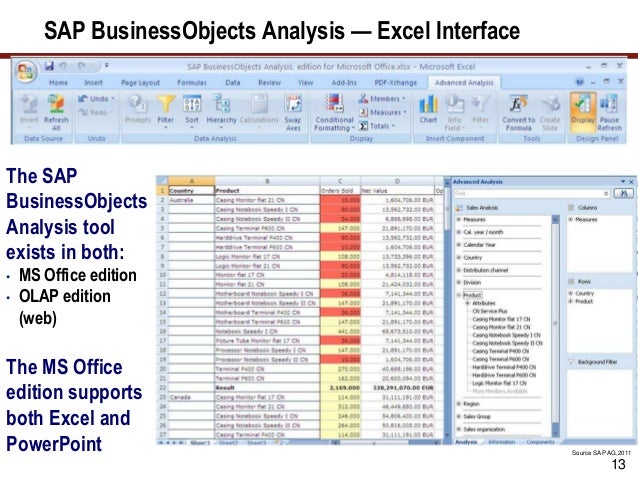
SAP BusinessObject Analysis is OLAP Tool that allows users to conduct in-depth interactive analysis.
SAP BusinessObjects Design Studio
Is a tool that gives application developers the ability to create mobile (ipad, android, windows mobile) and web based dashboards and applications based on data in SAP BW, SAP Business Suite, third party sources, and SAP HANA.
This tool is different from SAP BusinessObjects Dashboard, because this tool not just only can create dashboard, but have additional technical which need IT to create.
SAP Crystal Reports
SAP Crystal Reports is a tool with pixel formatted reporting capabilities that allows developers the full control of formatted reports.
Only SAP Crystal Report Enterprise can connect direct with SAP HANA. Another option to connect SAP Crystal Report is direct SQL connections trough JDBC (Java Database Connectifity), ODBC (Open Database Conectifity), and universe.
SAP Lumira
SAP Lumira is a tool to display and manipulate data in a way that makes it easier to understand in graphical format. This tool is ideal for users who are exploring large data sets.
This tool can use without any IT skills.
SAP BusinessObjects Dashboard
SAP BusinessObjects Dashboard aka XCelcius is a visualization tool that allows interactive analysis with graphs, charts, maps and other custom objects.
SAP BusinessObjects Dashboards allow developers to work in the rapid application design mode to quickly deliver stunning visualizations with minimal coding on standard objects.
SAP BusinessObjects Web Intelligence
Is a query tool that allows a deeper analysis to uncover hidden meaningful data. SAP BusinessObjects Web Intelligence allows users to easily add tables, charts, filters, and calculations to support a BI self-service model where users develop their own reports.
You can access SAP BusinessObjects Web Intelligence in three different interfaces: the rich client (installed onto a PC), Java-Based Client with BI Launch Pad in SAP BusinessObjects BI, and HTML web client, which can be executed by launching a report on the BI Launch Pad.
Feature of this Web Intelligence:
- User can edit/modify existing report, for example: add column, remove column, add new sheet (report) in existing web intelligence, etc.
- User can explore business questions.
- Also can enable static report (user cannot edit report) - apply security role.
- User can share report (with BI Launchpad and Email)
- User can save with another format
SAP BusinessObjects Explorer
SAP BusinessObjects Explorer is intended for users who conduct unstructured analysiss of data. This tool good for simple development and give users significant control over data exploration.
SAP BusinessObjects Analysis
SAP BusinessObject Analysis is OLAP Tool that allows users to conduct in-depth interactive analysis.
SAP BusinessObjects Design Studio
Is a tool that gives application developers the ability to create mobile (ipad, android, windows mobile) and web based dashboards and applications based on data in SAP BW, SAP Business Suite, third party sources, and SAP HANA.
This tool is different from SAP BusinessObjects Dashboard, because this tool not just only can create dashboard, but have additional technical which need IT to create.
SAP Crystal Reports
SAP Crystal Reports is a tool with pixel formatted reporting capabilities that allows developers the full control of formatted reports.
Only SAP Crystal Report Enterprise can connect direct with SAP HANA. Another option to connect SAP Crystal Report is direct SQL connections trough JDBC (Java Database Connectifity), ODBC (Open Database Conectifity), and universe.
SAP Lumira
SAP Lumira is a tool to display and manipulate data in a way that makes it easier to understand in graphical format. This tool is ideal for users who are exploring large data sets.
This tool can use without any IT skills.
Wednesday, 4 March 2015
Advanced Applications for SAP HANA
SAP HANA Live
SAP HANA live is a solution designed for those companies that run a combination of SAP Business Suite applications and non-SAP applications and companies that don't want to be tied to the traditional SAP reporting tools.
SAP HANA Live provides extensive real-time reporting capabilities across all SAP Business Suite applications based on prebuilt SAP data models.
We can avoid building your analytical solutions from stracth. Because your solutions in SAP HANA can be completed with savings in time and efforts by using very complex and strong prebuilt and certified SAP HANA data models - similar to the concept behind SAP BW Business Content.
SAP Predictive Analysis for SAP HANA
Next step is this, SAP Predictive Analysis, because customers are looking to leverage SAP HANA in the use of an SAP HANA enabled solution for preditive analytics.
Predictive analytics is a type of analytics solution that allows you to use historical information and trends, along with current and real-time information, to predict future results.
SAP Simple Solutions
SAP Simple Suite in the cloud is inteded to be composed of a number of SAP ERP tools. For example: finance, will incorporate a full range of finance solutions that include planning, analytics, acounting, financial operations, and consolidations. This process will leverage SAP in memory SAP HANA capabilities to accelerate these business process to close in real-time, for instance, rater than as a batch job.
SAP HANA live is a solution designed for those companies that run a combination of SAP Business Suite applications and non-SAP applications and companies that don't want to be tied to the traditional SAP reporting tools.
SAP HANA Live provides extensive real-time reporting capabilities across all SAP Business Suite applications based on prebuilt SAP data models.
We can avoid building your analytical solutions from stracth. Because your solutions in SAP HANA can be completed with savings in time and efforts by using very complex and strong prebuilt and certified SAP HANA data models - similar to the concept behind SAP BW Business Content.
Next step is this, SAP Predictive Analysis, because customers are looking to leverage SAP HANA in the use of an SAP HANA enabled solution for preditive analytics.
Predictive analytics is a type of analytics solution that allows you to use historical information and trends, along with current and real-time information, to predict future results.
SAP Business Planning and Consolidation for SAP HANA
What SAP BPC can do? SAP BPC can provide you with a single view of financial and operational data, standardizes management processes and model what if scenarios.
SAP BPC on SAP HANA is like traditional SAP BCP but with simpler, in-memory optimized cubes that yield faster performance for loading and reporting.
Because SAP BPC sits on top of SAP BW, so we need to implement sidecar version of SAP BW/SAP BPC or fully migrate existing SAP BW/ SAP BPC database to SAP HANA.
SAP Simple Solutions
SAP Simple Suite in the cloud is inteded to be composed of a number of SAP ERP tools. For example: finance, will incorporate a full range of finance solutions that include planning, analytics, acounting, financial operations, and consolidations. This process will leverage SAP in memory SAP HANA capabilities to accelerate these business process to close in real-time, for instance, rater than as a batch job.
Tuesday, 3 March 2015
SAP HANA in Cloud
Before we start, offcourse we need to know what term is: "Cloud".
Cloud is delivery of hosted services over the internet.
Cloud computing enables us to consume resource as a utility, just like electricity. We no need to built generator to create electricity, we just use it and pay it monthly.
SAP has two main SAP HANA based cloud offerings: SAP HANA Cloud Platform and SAP HANA Enterprise Cloud.
SAP HANA Cloud Platform
SAP HANA Cloud Platform enables customers and developers to build, extend, and run applications on SAP HANA in the cloud, which in turn allows them to take advantage of SAP HANA's capabilities.
A benefit of the SAP HANA Cloud Platform (like any of PaaS - Platform as a Services) is that we pay for what size application we build. We don't care with all hardware and SAP HANA licenses.
SAP HANA Enterprise Cloud
SAP HANA Enterprise Cloud is a private solutions that allows customers access to SAP HANA applications and platforms on a subscriptions basis without having to share infrastructure with others organizations.
Cloud is delivery of hosted services over the internet.
Cloud computing enables us to consume resource as a utility, just like electricity. We no need to built generator to create electricity, we just use it and pay it monthly.
SAP has two main SAP HANA based cloud offerings: SAP HANA Cloud Platform and SAP HANA Enterprise Cloud.
SAP HANA Cloud Platform
SAP HANA Cloud Platform enables customers and developers to build, extend, and run applications on SAP HANA in the cloud, which in turn allows them to take advantage of SAP HANA's capabilities.
A benefit of the SAP HANA Cloud Platform (like any of PaaS - Platform as a Services) is that we pay for what size application we build. We don't care with all hardware and SAP HANA licenses.
SAP HANA Enterprise Cloud
SAP HANA Enterprise Cloud is a private solutions that allows customers access to SAP HANA applications and platforms on a subscriptions basis without having to share infrastructure with others organizations.
SAP HANA Implementation Options
The three implementation options:
- SAP HANA as the foundation for a standalone data warehouse for analytics.
- SAP BW on SAP HANA.
- SAP Business Suite on SAP HANA.
Data warehouse for analytics.
In this implementation, we create new instance of SAP HANA to address a reporting or analytics need.
We need to get data into SAP HANA using ETL tool, create data model, install BI tools, and the last process is create report.
SAP BW on SAP HANA
In SAP BW on SAP HANA, we can optimize the performance of our existing SAP BW system, either by replacing your existing database with SAP HANA database, or running SAP HANA sidecar version of SAP BW that runs on SAP HANA.
SAP Business Suite on SAP HANA
With this, we can move our system (SAP ECC6, SAP APO (Advanced Planner and Optimzer), SAP BPC (Business Planning and Consolidation), SAP IP (Integrated Planning) using SAP HANA as database. We can also run SAP HANA as side car.
- SAP HANA as the foundation for a standalone data warehouse for analytics.
- SAP BW on SAP HANA.
- SAP Business Suite on SAP HANA.
Data warehouse for analytics.
In this implementation, we create new instance of SAP HANA to address a reporting or analytics need.
We need to get data into SAP HANA using ETL tool, create data model, install BI tools, and the last process is create report.
SAP BW on SAP HANA
In SAP BW on SAP HANA, we can optimize the performance of our existing SAP BW system, either by replacing your existing database with SAP HANA database, or running SAP HANA sidecar version of SAP BW that runs on SAP HANA.
SAP Business Suite on SAP HANA
With this, we can move our system (SAP ECC6, SAP APO (Advanced Planner and Optimzer), SAP BPC (Business Planning and Consolidation), SAP IP (Integrated Planning) using SAP HANA as database. We can also run SAP HANA as side car.
Subscribe to:
Posts (Atom)